

acs-logo-white

Access Control System

Automatic Gate Safety: What Every Property Owner Should Know

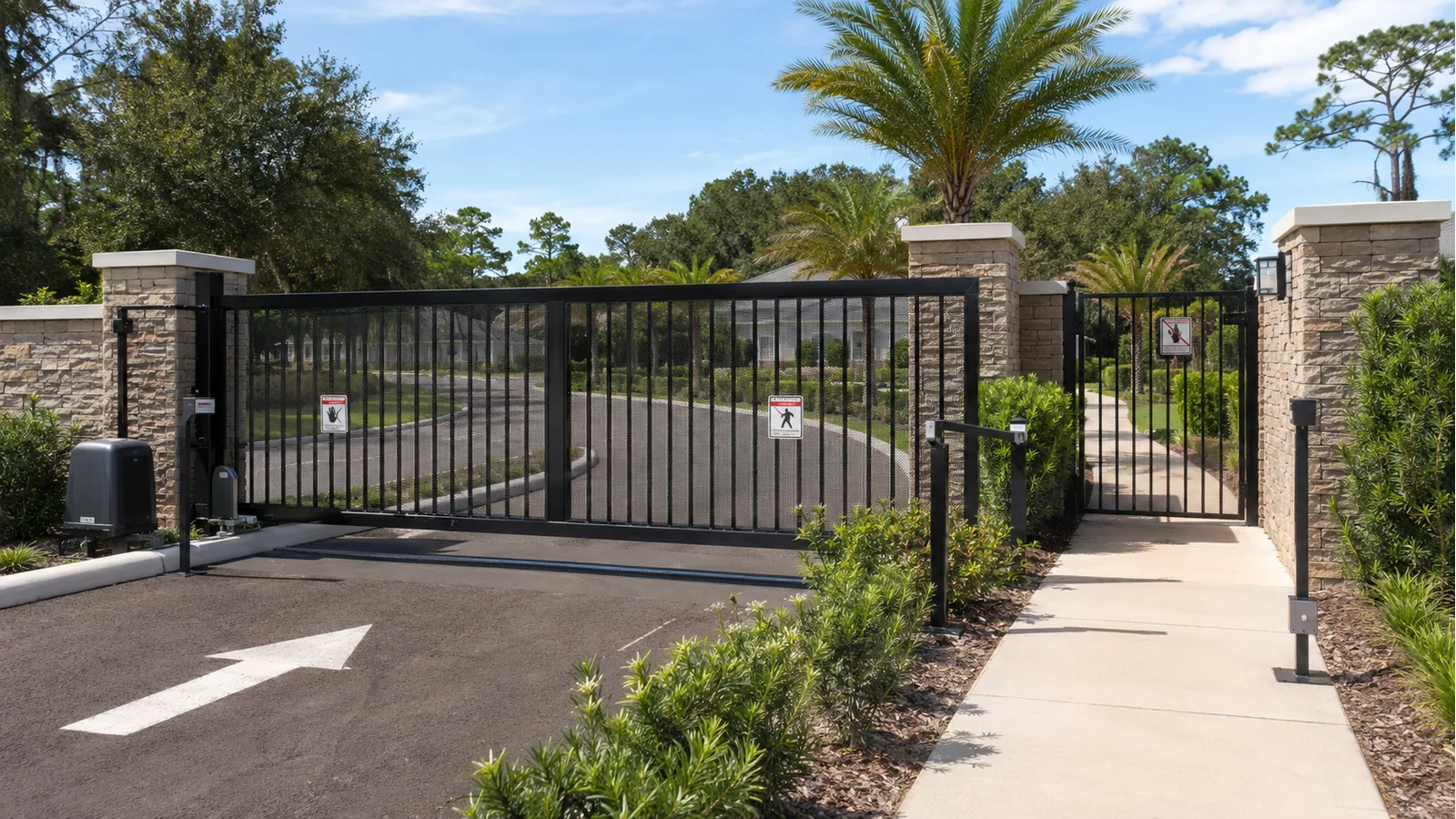
A safe entrance combines appropriate monitored devices, guarded hazards and a separate pedestrian route

An automatic gate is a large moving machine. Depending on its construction, it may weigh hundreds or thousands of pounds and create enough force to crush, trap or seriously injure a person. Safe operation depends on more than the gate operator: the gate, controls, monitored sensors, guards, vehicle detectors, warning signs and surrounding site must work together.

Property owners do not need to become gate technicians, but they should understand the hazards, recognize unsafe conditions and know when to take a system out of service.

Vehicular gates are for vehicles

An automatic vehicular gate should not serve as the normal pedestrian entrance. People move differently from vehicles: they may stop, turn around, reach through openings or stand in a location a vehicle detector cannot recognize.

A property should provide a separate pedestrian route located away from the moving gate and its entrapment areas. Residents, employees, delivery personnel and children should be instructed to use it.

What is an entrapment zone?

An entrapment zone is a location where a moving gate can trap a person between the gate and a fixed object, or between moving components.

Examples include:

  • The area between a swinging gate and a wall, column, fence or parked vehicle
  • The leading edge of a closing gate
  • The space where a sliding gate passes a fixed fence, post or wall
  • Exposed rollers, chains, hinges and operator arms
  • Openings in a moving gate that can catch a hand, foot or body

A professional safety evaluation identifies these zones before deciding where sensors, edges, screening and guards belong.

The operator must match the application

Gate operators are marked for intended types of use, ranging from single-family residential properties to public commercial, industrial and guarded restricted-access locations. A system should use an operator appropriate for the site, gate and traffic.

Correct selection also considers gate length, weight, construction, wind exposure and duty cycle. The operator should move a gate that is already mechanically sound; it should never be used to overpower damaged hinges, dragging rollers or poor geometry.

Monitored entrapment protection

Modern operator systems use external devices that communicate their operating status to the controller. Depending on the gate configuration and identified hazards, protection may include:

  • Photoelectric sensors: detect an interruption in a beam without physical contact.
  • Sensing edges: respond when a moving edge contacts an obstruction.
  • Inherent protection: detects abnormal force or current within the operator.
  • Guards and screening: restrict access to rollers, pinch points and hazardous openings.

The controller may restrict or prevent gate movement when a required monitored device is missing, misaligned or has failed its test. That condition should be diagnosed and repaired. Jumping terminals or bypassing a sensor defeats the protection the system was designed to provide.

Vehicle loops and free-exit sensors have important traffic-control functions, but they should not automatically be treated as substitutes for required entrapment protection.

Warning signs and user controls

Warning signs should be visible on both sides of an automated vehicular gate. Controls used to move the gate should be located so the user cannot reach through or over the gate while operating them.

Remote controls, keypads, telephone entry and mobile credentials should be managed as security devices. Lost credentials should be removed promptly, and temporary access should expire when it is no longer needed.

Keep the gate structurally safe

Automation cannot correct a dangerous gate. A gate should remain upright, move smoothly and be restrained from falling, derailing or moving beyond its intended path.

Watch for:

  • Sagging leaves or loose hinges
  • Cracked welds or damaged posts
  • Worn or broken rollers
  • Loose chains or exposed sprockets
  • A bent track or guide assembly
  • Collision damage
  • Corrosion affecting structural components
  • New landscaping, walls or stored objects in the gate path

Adding solid panels or decorations can also increase gate weight and wind load. An operator and structure selected for an open-picket gate may no longer be appropriate after that modification.

Safe owner checks

A property owner or designated manager can perform a visual check without opening electrical equipment:

  1. Keep people and vehicles clear of the gate path.
  2. Look for structural damage, loose hardware and obstructions.
  3. Confirm that warning signs remain visible.
  4. Check that the separate pedestrian entrance is usable.
  5. Observe whether photo eyes and sensing edges are secure and undamaged.
  6. Note unusual noises, speed changes, hesitation or reversal.
  7. Record controller messages that are visible without entering an enclosure.
  8. Arrange professional service if anything is questionable.

Functional testing should follow the current operator and sensor manufacturers’ instructions. Community and commercial properties should document inspections and repairs.

Unsafe conditions that need prompt attention

Stop using the automatic function and request service when:

  • The gate has been struck, derailed or structurally damaged
  • A safety device has been bypassed or disconnected
  • The gate does not stop or reverse as intended
  • People routinely walk through the vehicular opening
  • Exposed rollers, openings or pinch points are accessible
  • The gate moves unpredictably or with excessive force
  • The operator repeatedly displays a monitored-sensor or overload fault
  • Flooding, lightning or electrical damage is suspected

Follow the manufacturer’s approved procedure for securing or manually operating the gate. Do not improvise around energized or moving equipment.

Why periodic professional inspections matter

Entrances change over time. Pavement settles, hinges wear, vegetation grows, sensors move, credentials accumulate and traffic patterns change. A system that operated correctly when installed may develop hazards or reliability problems years later.

A professional inspection should evaluate the mechanical gate, operator, entrapment zones, monitored devices, vehicle detection, access controls, electrical installation and actual user behavior. Corrections can then address the whole entrance rather than a single symptom.

Access Control Jacksonville is operated by Edwards Ornamental Iron, a company serving the region since 1947. Edwards is licensed and insured, holds a Florida electrical license and uses factory-trained technicians to service gates, operators and access-control equipment throughout Northeast Florida and Southeast Georgia.

Call (904) 354-4282 to request an automatic-gate safety inspection.

Suggested internal links: What Is UL 325?; Photo Eyes vs. Safety Edges; How Often Should an Automatic Gate Be Serviced?; Why Won’t My Automatic Gate Open?